



mGuide Pellegrino
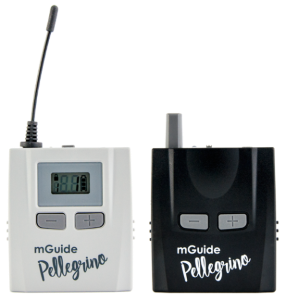
1. Illustration
Transmitter (Tx) / Receiver (Rx)
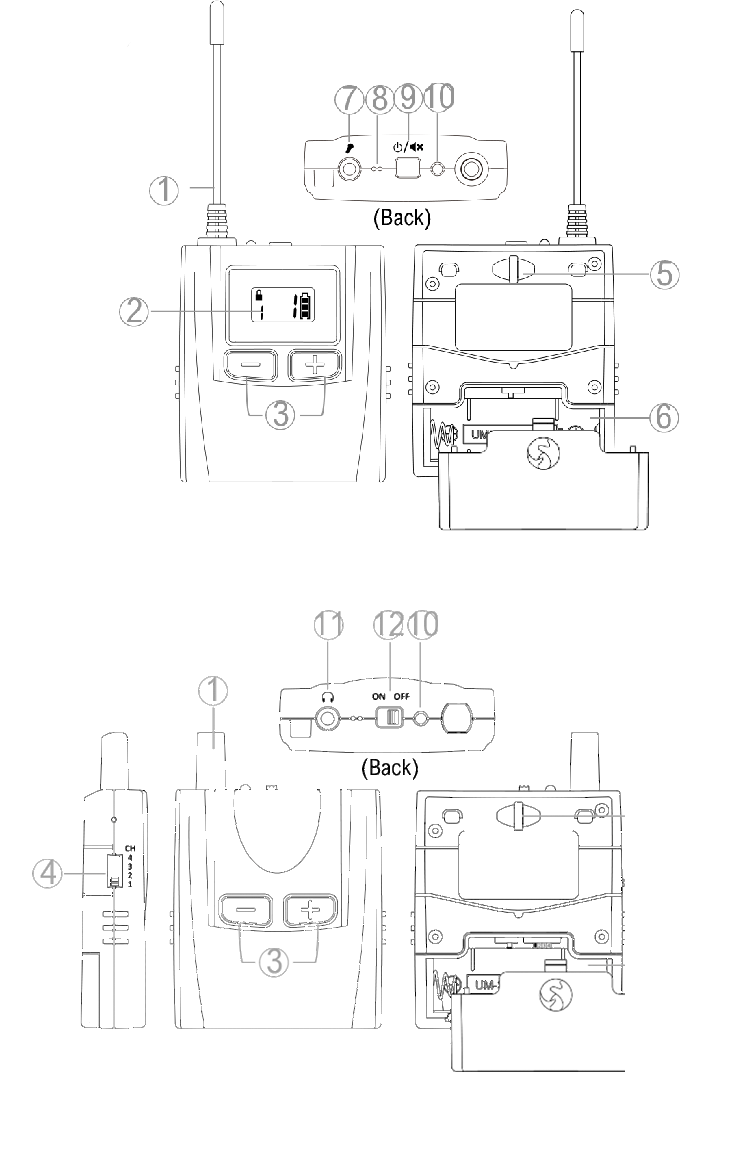
- Antenna
- Display
- +/- Button
- Change channel
- Lanyard Hole
- Battery Compartment (AA*1)
- 3.5 mm Microphone Input (TS)
- Built-in Microphone
- Power / Mute Button
- Signal LED
- 3.5 mm Headphone Input (TRS)
- Power On / Off Button
2. Display
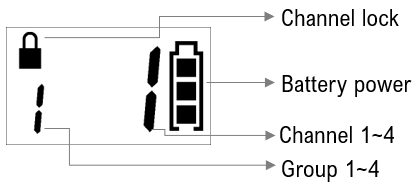
3. Low Battery Level
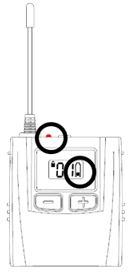
Replace the battery when the indicator lights up red and the battery symbol shows only one bar.
4. LED Indicator
|
LED Status |
Transmitter (Tx) |
Receiver (Rx) |
|---|---|---|
|
Blue |
Sufficient Battery Level |
|
|
Red |
Low Battery Level |
|
|
Steady |
Device is On |
Device is On and in Group |
|
Flashing |
Microphone Muted |
Device is Out of Group |
|
Off |
Device is Off |
Device is Off |
5. Settings
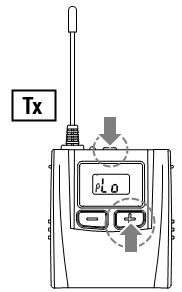
Transmitter (Tx)
Before use, adjust the transmitter settings to your preferences.
- Signal Output Power: Lo / Hi (Hi for higher signal output power)
- Microphone Volume Level (sensitivity): 1 / 2 / 3 (3 is maximum).
- Press and hold + and ⏻︎ simultaneously to turn on the transmitter.
- The signal output power screen will appear
 . Set using + or -, then press the power button ⏻︎ to confirm your selection and proceed to the next setting.
 - The microphone volume screen will then appear
 . Set your preferred volume using + or -. Confirm with the power button ⏻︎.
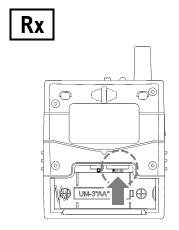
Receiver (Rx)
Before use, select the appropriate group on the receiver.
① Group: 1 / 2 / 3 / 4
- Ensure that your group has the same number as the transmitter.
6. Operating Instructions
Power On
Transmitter: Press and hold ⏻︎ for 1 second to turn on the device.
Receiver: Set the power switch to the ON position.
Select Your Channel
Transmitter: Press and hold the + and - buttons simultaneously for approximately 2 seconds until the 🔒︎ symbol disappears. Select your channel using the + or - buttons, wait 3 seconds, or confirm by pressing the power button ⏻︎.
Receiver: Select the same channel number (④) as on the transmitter.
Mute Microphone on Transmitter
A short press of the power button ⏻︎ will temporarily mute or unmute the microphone during a tour.
Volume Adjustment on Receiver
Press + or - to set the receiver volume (level 1~15, default: 8) during use.
⚠ Warning
Prolonged listening at high volume levels may cause hearing damage.
Power Saving on Receiver
The receiver will automatically turn off (LED indicator is off) if it does not receive a signal from the transmitter for 20 minutes. If necessary, switch the power switch to OFF and then ON to resume operation.
Power Off
Transmitter: Press and hold ⏻︎ for 2 seconds to turn off the device.
Receiver: Set the power switch to the OFF position.
7. Specifications
|
Parameter |
Value |
|---|---|
|
Oscillation Type |
PLL Synthesized Control OSC |
|
Frequency |
863~865 MHz |
|
Number of channels |
16 |
|
Range |
~ 100 meters |
|
Operating Time |
~ 18 hours with alkaline battery |
|
Battery |
AA alkaline or Ni-MH battery x 1 |
|
Microphone/Headphone Jack |
3.5 mm |
|
Dimensions (W x H x D) |
60 x 90 x 20 mm |
|
Weight |
70 g (with battery) |