



mGuide DLR-01
1. General Information
1.1. Description
mGuide DLR is a technologically advanced digital tour guide system for guides, as well as business trainers and coaches, enabling worldwide use thanks to 2.4GHz band transmission.
1.2. Main Features
- Worldwide open (license-free) 2.4GHz ISM band
- Ability to transmit from 2 transmitters simultaneously on the same channel – e.g., simultaneous announcements from a guide and tour leader to tour members, as well as full-duplex communication between the 2 transmitters
- Transmitter range - 150 meters in line of sight
- 80 available channels
- 5-level microphone sensitivity control in the transmitter and an AUX input for connecting an external audio source, e.g., background music from an mp3 player
- Crystal clear transmission, 2 headphone outputs in the receiver
- Compact size (50x88x15mm) and weight (only 60g)
- Long battery life - mGuide DLR-01T 10h, mGuide DLR-01R 15h
- Convenient charging cases (drop-in pocket system) and additionally the possibility to charge via USB port with a standard phone charger
2. Device Diagram
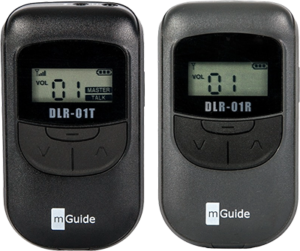
2.1. mGuide DLR-01T (Transmitter)
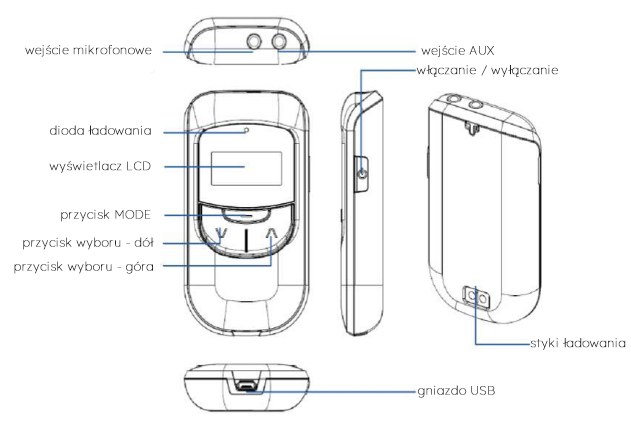
2.2. mGuide DLR-01R (Receiver)
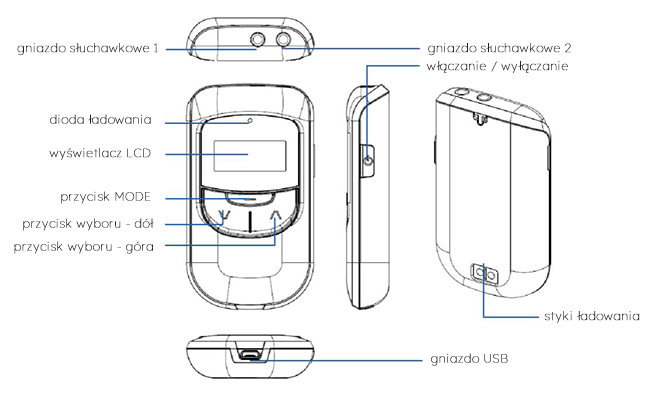
3. Operation
3.1. Powering On and Off
Press and hold the “Power On/Off” button for at least 2 seconds to turn on. To turn off, press and hold the “Power On/Off” button for at least 2 seconds.
3.2. mGuide DLR-01T Transmitter
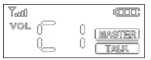
Transmission will start automatically when the device is turned on. The display shows: 📶︎, C1, [MASTER] and [TALK]. Group and ID numbers are set to "00" by default.
3.3. mGuide DLR-01R Receiver
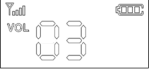
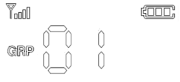
The 📶︎ symbol appears in the upper left corner of the display, and the transmission signal strength is proportional to the number of bars on the symbol. The default volume is set to “03” and the group number (channel) to “00”.
3.4. Changing the channel (group/GRP) in mGuide DLR transmitter and receiver
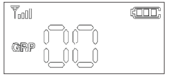
Press and hold the MODE button for at least 2 seconds. The display will show a flashing GRP message.
Select the channel number using the up-down ▲▼ buttons. After 5 seconds, your selection will be automatically confirmed, the GRP message will stop flashing, and the display will show the selected channel number (group/GRP).
3.5. Setting the ID in the mGuide DLR-01T Transmitter
The mGuide DLR has the unique ability to transmit from 2 transmitters simultaneously (and communicate between them) on the same channel (in the same group). For this to be possible, each transmitter should have a different ID number – “00” for the first and “01” for the second transmitter.
The transmitter with ID “00” is the so-called MASTER transmitter. Each channel (group) in use must have 1 MASTER transmitter assigned.
The transmitter with ID “00” shows “MASTER” and “TALK” on the display. The transmitter with ID “01” only shows “TALK”.
If only 1 transmitter is used per channel, it must have ID “00” set.
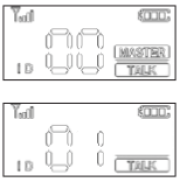
To change the ID number:
- press and hold the MODE button for at least 2 seconds until you see the flashing GRP message.
- Then briefly press the MODE button once.
- A flashing ID message will appear on the display.
Use the up-down ▲▼ buttons to select “00” or “01”. After 5 seconds, your selection will be automatically confirmed, the ID message will stop flashing, and the display will show the selected ID number.
3.6. Selecting the microphone sensitivity level in the mGuide DLR-01T Transmitter
Next to the VOL message on the transmitter display, the message "C1" is visible.
Using the up-down ▲▼ buttons, select the desired microphone sensitivity level in the range of 0 to 5.
3.7. Volume adjustment in the mGuide DLR-01R Receiver
The numbers to the right of the "VOL" message on the receiver indicate the set volume level.
Using the up-down ▲▼ buttons, select the desired volume level in the range of 0 to 9.
3.8. AUX input in the mGuide DLR-01T Transmitter
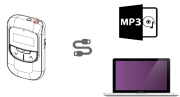
The DLR transmitter offers the possibility of simultaneous voice transmission via microphone and, for example, background music from a player connected to the AUX input.
Using a 3.5mm jack-to-jack cable (not included, to be purchased separately), connect one plug to the Aux In input on the transmitter and the other to the Audio output on any player (mp3, phone, tablet, etc.).
⚠ Note
The AUX cable (AU-01) may not work. This depends on the wiring diagram of the audio output of the source device. Check the wiring diagram using "mGuide DLR-01T" and connect it correctly.
3.9. Muting the microphone in the mGuide DLR-01T transmitter (mute)
Mute activated
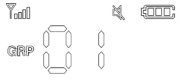
Briefly press the MODE button on the transmitter to activate microphone mute. The display will show a crossed-out speaker icon.
Microphone works normally
Briefly press the MODE button on the transmitter again to deactivate mute. The crossed-out speaker icon will disappear from the display.
4. Battery
mGuide DLR-01T and mGuide DLR-01R are equipped with 3.7V rechargeable lithium-ion batteries with a capacity of 800mA. Batteries are charged without removal from the devices by inserting them into a charger pocket (CB20x or CB40x) or by using a cable (to be purchased separately) and a USB port (bottom edge of the device) and, for example, a standard USB phone charger.
During charging, the LED in the upper right part of the device glows red. After charging, the LED turns off.
5. Technical Specification
|
Parameter |
Value |
|---|---|
|
Radio band |
ISM 2403MHz ~ 2480MHz |
|
Type |
Wireless microphone / receiver |
|
Modulation |
GFSK with frequency hopping |
|
Codec |
16 KHz / 16 bits |
|
Max. transmitter power |
10 mW |
|
Receiver sensitivity |
-95 dBm |
|
Latency (delay) |
< 20 ms |
|
Number of channels |
80 |
|
Channel spacing |
500 KHz |
|
Transmission speed |
500 Kbps |
|
Bandwidth |
500 KHz |
|
Battery |
lithium-ion @ 3.7V 800mA |
|
Antenna |
internal chip antenna |
|
Operating time |
mGuide DLR-01T - 10h (typical), mGuide DLR-01R - 15h (typical) |
|
Power consumption |
100 mW |
|
Range |
150 m |
|
Frequency response |
50 Hz ~ 8 kHz |
|
Maximum number of transmitters on 1 channel simultaneously |
2 transmitters |
|
Dimensions / Weight |
50 mm x 88 mm x 15 mm / 60g |