



User Manual
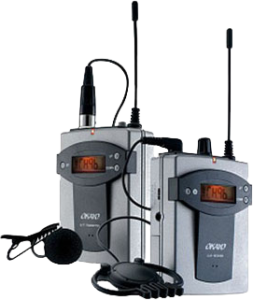
Okayo EJ-7
Instructions
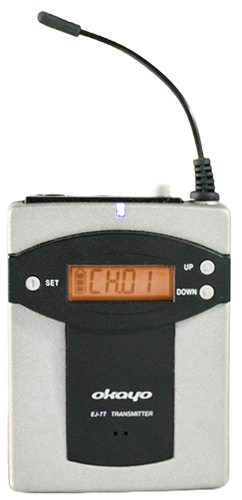
Okayo EJ-7T
Transmitter
Okayo EJ-7R
Receiver
Okayo EJ-7T User Manual
1. Device Diagram
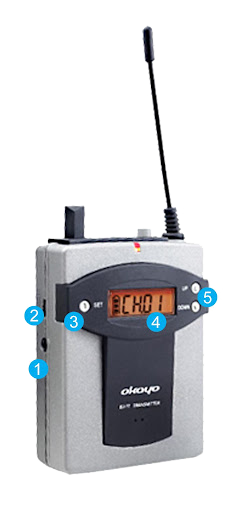
- Aux In Input (3.5mm)
- Microphone Sensitivity Level
- Button to initiate/end channel change
- LCD Display (battery charge indicator, selected channel number)
- Channel Selection (change channel up or down)
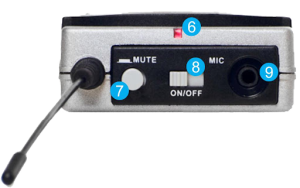
- Power and Signal Indicator (red – device is on)
- Microphone Mute Button
- On/Off Switch
- Microphone Input (3.5 mm jack)
2. Operating Instructions
- Turn on the transmitter (No. 8) – the power LED (No. 6) will light up.
- Connect the microphone to the microphone input jack (No. 9).
- To change the channel, press and hold the SET button (No. 3) for 2-3 seconds. The channel number will flash. Select the channel using the UP or DOWN buttons (No. 5). Confirm your selection by pressing the SET button again.
- To set the microphone sensitivity level, turn the knob (No. 2).
- If the battery indicator is empty, rechargeable batteries (Ni-MH) should be charged by placing the device in the charger (alternatively, you can use AA alkaline batteries).
⚠ Warning
Never place the device in the charger if alkaline batteries are inside!
Okayo EJ-7R User Manual
1. Device Diagram
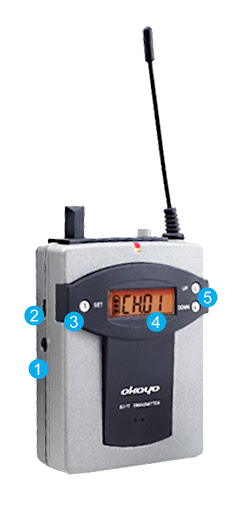
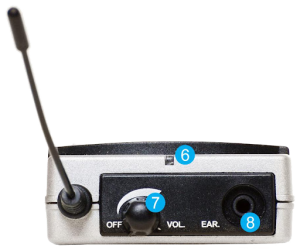
- Aux Out Output (3.5mm)
- Aux Out Output Volume Level
- Current Frequency
- LCD Display (battery charge indicator, selected channel number)
- Channel Selection (change channel up or down)
- Power and Signal Indicator (red – device is on, green – receiving signal from transmitter)
- On/Off Switch and Volume Control
- Headphone Input (3.5 mm jack)
2. Operating Instructions
- Turn on the receiver (No. 7) – the power LED (No. 6) will light up.
- Connect headphones to the headphone input jack (No. 8).
- To change the channel, press the UP or DOWN button (No. 5) accordingly.
- If the battery indicator is empty, rechargeable batteries (Ni-MH) should be charged by placing the device in the charger (alternatively, you can use AA alkaline batteries).
⚠ Warning
Never place the device in the charger if alkaline batteries are inside!