



Axiwi AT-320
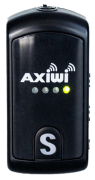
1. Device Illustration and Description
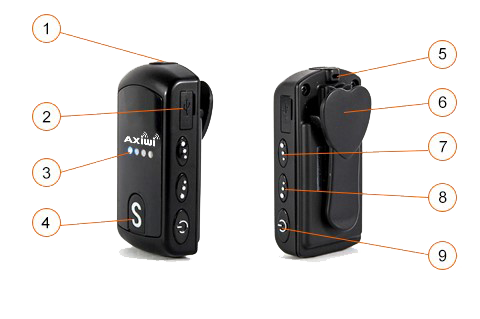
- 3.5 mm Jack Headphone-Microphone Port
- Micro USB Port
- Channel (4 different LED colors for 4 channels):
- Channel No. 1 – blue color
- Channel No. 2 – orange color
- Channel No. 3 – red color
- Channel No. 4 – green color
- Multi-functional communication button:
- Activates transmission
- Deactivates transmission
- Indicates charging status (charging → red, charged → green)
- Lanyard clip
- Belt clip
- Volume up button for reception audio
- Volume down button for reception audio
- Power button
2. Operating the Axiwi AT-320 System
2.1. Selecting the Communication Channel
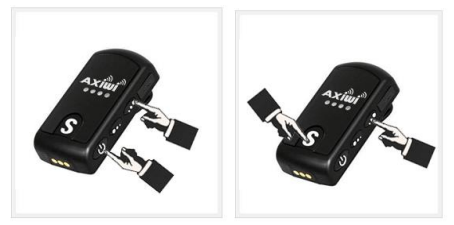
- Before powering on the devices, connect the headset-microphones to the 3.5mm jack ports in the AT-320 (1).
This will help verify that the devices are functioning correctly. - Select the device whose user will be the "master" (Section 2.2).
- Turn on the device by simultaneously pressing and holding the volume up button for reception audio (7), then pressing the power button (9).
- The LED on the "master" device glows steadily, indicating correct mode activation.
- Select the channel on which the group will communicate by pressing and holding the volume up button for reception audio (7), then repeatedly pressing the multi-functional communication button (4) until the desired channel is selected:
- Channel No. 1 – blue color
- Channel No. 2 – orange color
- Channel No. 3 – red color
- Channel No. 4 – green color
- Confirm the selected channel by releasing both buttons.
- After selecting the group communication channel, power on the remaining AT-320 devices that will operate in "follower" mode by pressing and holding the power button (9) (Section 2.3).
- The LED on the "follower" device flashes, indicating correct mode activation.
- Select the same channel on the "follower" device as on the "master" device.
The LED color helps determine if the devices are on the same channel.
2.2. “MASTER” Communication Mode
“MASTER” is a device that enables and manages communication for the entire group. Each communication channel in the Axiwi AT-320 system must have one device operating in “master” mode. If there is no device in this mode on the channel or if it switches off, the entire group loses the ability to communicate with each other.
An AT-320 in “master” mode has several options for managing the group of “followers”, such as:
- one-time deactivation of communication in “follower” devices,
- microphone muting,
- blocking communication in “follower” devices.
After activating “master” mode and connecting a microphone, the user of such a device can immediately communicate with the group. None of the users of “follower” devices can mute or remove the “master” from the group.
2.3. “FOLLOWER” Communication Mode
“FOLLOWER” is a device that can communicate with the entire group or only receive audio transmission. An AT-320 in “follower” mode can only join or leave group communication.
Up to 5 users + 1 “master” user, i.e., 6 devices, can communicate simultaneously in full duplex. If a 7th user joins the conversation, the AT-320 “follower” device that has been active the longest is automatically removed from communication mode.
2.4. Communication Method
Applies to AT-320 users in “follower” mode. An AT-320 user in “master” mode automatically has group communication enabled.
To enable transmission (speaking through the microphone), press the multi-functional communication button on the “follower” device (4).
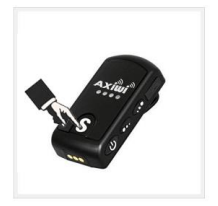
Activated transmission mode is indicated by a single “Ddoo” sound and illuminated LEDs (except for the one indicating the communication channel).
To disable transmission, press the multi-functional communication button on the “follower” device (4).
Deactivated transmission mode is indicated by a double “Ddoo” sound and extinguished LEDs (except for the one indicating the communication channel).
2.5. Additional Functions of AT-320 in “MASTER” Mode
Deactivating communication in “follower” devices:
- press the multi-functional communication button (4) to temporarily disable transmission for AT-320 “followers”. After deactivation, “followers” will be able to rejoin group communication.
Muting the microphone:
- press and hold the multi-functional communication button (4) for approximately 3 seconds to mute the microphone. Correct microphone muting is indicated by a single “Ddoo” sound. Unused channel LEDs will flash regularly.
During this time, users in “follower” mode can continue to communicate with each other within the group.
- Press and hold the multi-functional communication button (4) for approximately 3 seconds to unmute the microphone. Correct microphone unmuting is indicated by a double “Ddoo” sound.
Blocking communication in “follower” devices:
- press and hold the volume down button for reception audio (8) for approximately 3 seconds to block “followers” from joining group communication. Correct communication blocking is indicated by a double “Ddoo” sound.
⚠ Note
If a “follower” has transmission mode enabled during the setting, they can transmit during the block.
To simultaneously disable transmission for followers and block this capability, communication in “follower” devices must be deactivated before performing this action (see above). A “follower” can also voluntarily disable transmission (see section 2.4), after which they will not be able to enable transmission until the “master” unblocks this communication.
3. LED Status
|
LED Color |
Status |
|---|---|
|
Red |
Charging |
|
Green |
Charged |
|
LED Color |
Channel |
|---|---|
|
Blue |
CH1 |
|
Orange |
CH2 |
|
Red |
CH3 |
|
Green |
CH4 |
4. Audio Signal
|
Sound Type |
Option / Event |
|---|---|
|
Master: “Ddoo Ddoo” |
Power On |
|
“Ddoo Ddoo” |
Power Off |
|
“Ddoo” |
Transmission Mode On |
|
“Ddoo Ddoo” |
Transmission Mode Off |
|
Block: “Ddoo Ddoo” |
Communication Block / Unblock |
5. Charging the Axiwi AT-320 System
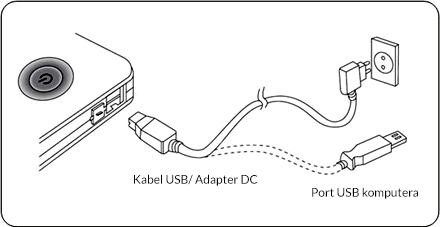
- Connect the USB cable or DC power adapter to the Micro USB port (2) on the AT-320 device to begin charging. The LED will turn red.
- Charging time is approximately 2 hours. If the device is fully charged, the LED will turn green.
6. Technical Specifications
|
Parameter |
Value |
|---|---|
|
Frequency |
2.403 – 2.481 MHz |
|
Modulation |
GFSK modulation with frequency hopping |
|
Number of Channels |
4 |
|
Simultaneous Communication |
Up to 6 devices (5 follower + 1 master) |
|
Maximum Output Power |
100 mW |
|
Maximum Reception Sensitivity |
-97 dBm |
|
Channel Spacing Frequency |
1 MHz |
|
Data Transfer Rate |
250 Kbps |
|
Frequency Response |
300 ~ 3,400 Hz |
|
Range |
+/- 250 meters |
|
Battery Capacity |
Li-Po 3.7 V 800 mAh |
|
Operating Time |
Up to 6 hours |
|
Charging Time |
+/- 2 hours |
|
Size |
32 x 65 x 22 mm |
|
Weight |
39 g |
|
Additional Information |
Lanyard clip, Micro USB Port, 3.5 mm Jack Input |