



mGuide DLR-02
1. General Information
1.1. Introduction
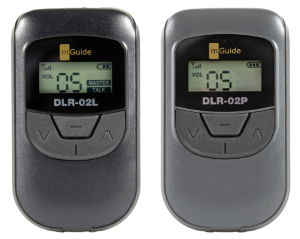
The "mGuide DLR-02L" and "mGuide DLR-02P" devices provide the most optimized way for wireless, mutual full-duplex discussion and communication between the leader and any participant, while all other members listen. It combines quality and versatility through compact and easy-to-use devices, equipped with state-of-the-art technology.
1.2. Key Features
- Full-duplex discussion between the leader and any participant, while all other members listen.
- Fully digital, crystal-clear audio quality and optimal volume over a distance of
150 m. - Direct, 5-step microphone sensitivity selection and AUX input for background music
playback. - Ability to listen to the leader's voice with any preferred background music or sound effect.
- Extremely easy setup in just 3 steps and user-friendly functions.
- Ultra-compact (50 x 88 x 16.5 mm) and lightweight (60 g) system.
- Convenient drop-in or USB charging system.
2. Buttons and Indicators
2.1. mGuide DLR-02 LEADER
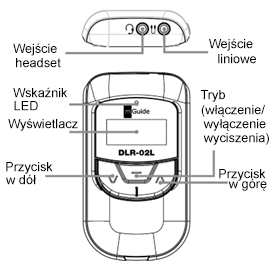
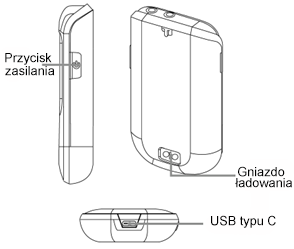
2.2. mGuide DLR-02 PARTICIPANT
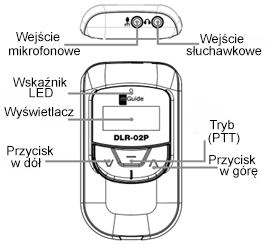
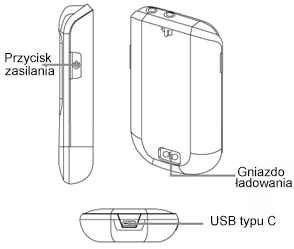
3. How to Use
3.1. Power On / Off
Press and hold the "Power" button for more than 2 seconds to turn on the device. To turn off the device, press and hold the "Power" button again for more than 2 seconds.
3.2. mGuide DLR-02L
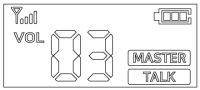
Transmission starts automatically when the device is powered on. The LCD displays VOL 03 and  icons by default. The default group number is "00".
Adjust the volume level using the ▲ or ▼ button.
Set the same group number (see section 3.4) for mGuide DLR-02L and mGuide DLR-02P and use the device.
3.3. mGuide DLR-02P
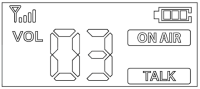
The 📶︎ and VOL 03 icons appear on the LCD when the device is powered on and the mGuide DLR-02L and mGuide DLR-02P devices are set to the same group number. The default volume level and group number are "03"
and "00".
Connect the headset (ELM-01) to the 🎙 port or the 🎧︎ port. Adjust the volume level using the ▲ or ▼ button.
Set the same group number for mGuide DLR-02L and mGuide DLR-02P devices (see section 3.4). If you want to talk
to the leader, press and hold the PTT button for more than one second.
The [ON AIR] and [TALK] icons appear when transmission is successfully activated.
The [ON AIR] icon appears on the LCD momentarily when any other member speaks after pressing the PTT button before you. In this case, you must wait until [ON AIR] disappears. If you press the PTT button while the [ON AIR] icon is on the display, the PTT function will not be activated with a beep.
3.4. Group Selection for mGuide DLR-02L and mGuide DLR-02P
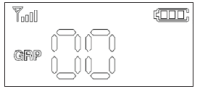
Press and hold the ▲ and ▼ buttons for more than 2 seconds. The text "GRP" flashes on the LCD.
Select the group number using the ▲ or ▼ button, release all buttons, and wait for more than 2 seconds for the settings to be confirmed. When the "GRP" icon stops flashing, the newly selected group number will appear on the LCD.
3.5. Microphone Gain Setting in mGuide DLR-02L and mGuide DLR-02P
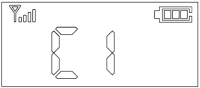
Press and hold the ▲ and ▼ buttons for more than 2 seconds. The text "GRP" flashes on the LCD.
Press the Mode button once. The current microphone gain setting will appear on the LCD. The default setting is "C1". Change the settings using the ▲ and ▼ buttons. The microphone gain level can be set from 1 to 5.
3.6. Sidetone Setting in mGuide DLR-02L and mGuide DLR-02P
Press and hold the ▲ and ▼ buttons for more than 2 seconds. The text "GRP" flashes on the LCD.
Press the Mode button twice. The current sidetone setting will appear on the LCD. The default setting is "SO".
Change the setting using the ▲ or ▼ button.
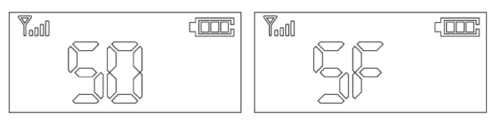
- Sidetone On (SO); You can hear your voice through the headset during a conversation.
- Sidetone Off (SF); You cannot hear your voice through the headset during a conversation.
3.7. Talk Distance Selection in mGuide DLR-02L
Press and hold the ▲ and ▼ buttons for more than 2 seconds. The text "GRP" flashes on the LCD. Press the Mode button 3 times. "P7" will be displayed on the LCD.
Press the ▲ button to increase the talk distance and the ▼ button to decrease the talk distance. The talk distance level can be adjusted from 1 to 7. P7 indicates the maximum talk distance in a typical environment.
Reference Table
|
Parameter |
Value |
Number of simultaneous users in the same location |
|---|---|---|
|
P7 |
10-20m |
80 groups |
|
P1 |
50-70m |
More than 10 groups |
|
P4 |
170m |
More than 4 groups |
3.8. Playing Audio from an External Source in mGuide DLR-02L
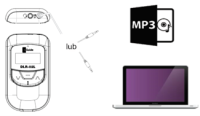
It is possible to broadcast with background music. Connect the cable between the line input and the external audio source using the optional line input cable (LC-01) and adjust the desired music volume level. Connect the cable between the line input and the external audio source using the optional line input cable (LC-01) and adjust the desired music volume level.
⚠ Note
The line input cable (LC-01) may not work depending on the wiring diagram of the external audio source. Check the wiring diagram of the external audio source and match it to the line input wiring diagram for the mGuide DLR-02L device.
3.9. Microphone Mute On / Off in mGuide DLR-02L
The mGuide DLR-02L device has a microphone mute on/off function. By default, the mute function is off.
Briefly press the "Mode" button to turn on microphone mute. A crossed-out speaker icon will appear on the LCD.
Briefly press the "Mode" button again to turn off microphone mute. The crossed-out speaker icon will disappear from the LCD.
4. Battery
Each mGuide DLR-02L and mGuide DLR-02P device contains a 3.7 V, 1100 mAh Li-Ion rechargeable battery.
Connect the USB charging cable to the USB port to charge the battery.
A red LED on top of the device turns on during charging and turns off when the battery is fully charged.
5. Technical Specification
|
Parameter |
Value |
|---|---|
|
Radio Frequency Type |
ISM 2403MHz ~ 2480MHz |
|
Communication Type |
Full duplex |
|
RX Sensitivity |
95 dBm |
|
Number of Groups |
max. 80 |
|
Battery |
3.7 V 1100 mAh Li-Ion Battery |
|
Antenna |
Internal |
|
Operating Time |
Approximately 10 hours for leader and 15 hours for participant |
|
Range |
150 m |
|
Dimensions |
50 mm x 88 mm x 16.5 mm |
|
Weight |
65 g |
|
Display Type |
Positive |
|
Inductive Loop |
Supported |