



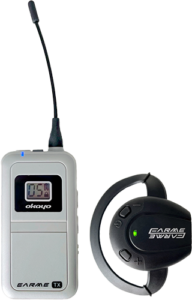
Okayo EarME
⚠ Battery Warning
- Fully charge the devices before first use.
- Charge the device when the battery level is below 50%.
- Before long-term storage, ensure the battery capacity is 50% and charge the devices every 3 months.
- Stop using the device if you notice overheating or battery damage. Contact your dealer.
1. Interface
ME1 Receiver
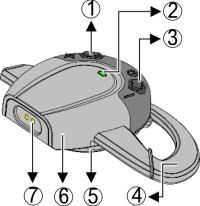
- Volume Up (+)
- Signal / Battery / Charging Indicator
- Power Button / Volume Down (−)
- Ear Hook
- Speaker (HAC)
- Built-in Battery
- Magnetic Charging Contacts
ME1T Transmitter
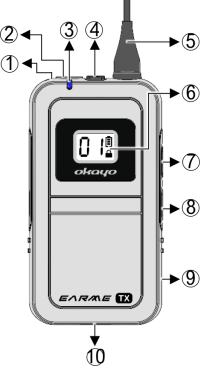
- Built-in Microphone
- 3.5 mm Microphone Input (TS)
- Signal / Battery / Charging Indicator
- Power / Mute Button
- Antenna
- Display
- Up Button (+)
- Down Button (−)
- Built-in Battery
- USB-C Charging Port
2. General Operations
Turning on the device (applies to ME1T transmitter and ME1 receiver)
Press and hold the power button for 1 second to turn on the device.
Muting the microphone (applies to ME1T transmitter)
A short press of the power button deactivates (mutes) or activates the microphone on the ME1T transmitter.
When the LED on the transmitter:
- flashes slowly — the device is muted,
- is steadily lit — the microphone is on.
Adjusting receiver volume (applies to ME1 receiver)
Press the Up + button or the Down − button to adjust the receiver volume.
⚠ Note
Listening to music at high volume for extended periods can cause hearing damage!
Turning off the device (applies to ME1T transmitter and ME1 receiver)
Press and hold the power button for 2 seconds to turn off the transmitter. Additionally, the ME1 receiver will automatically turn off if:
- the transmitter is turned off first,
- it does not receive a signal from the ME1T transmitter for 5 minutes.
3. Pairing devices before starting a tour
⚠ Important
Before the tour, ensure all members (receivers) are paired.
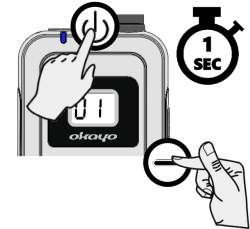
STEP 1. Press and hold the power button and the Down − button simultaneously for 1 second to turn on the ME1T transmitter.
STEP 2. Within 5 seconds of turning on the transmitter, select a channel using the Up + button or the Down − button and confirm by pressing the power button.
STEP 3. When the signal indicator on the ME1T transmitter starts to flash rapidly, turn on the ME1 receiver (by holding the power button for 1 second) to pair.
STEP 4. Exit pairing mode by pressing the power button on the ME1T transmitter.
4. Adding participants to a group during a tour
Pairing additional receivers with the ME1T transmitter during a tour.
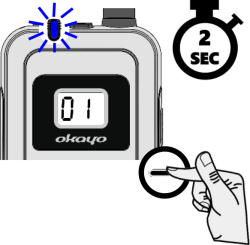
STEP 1. Press and hold the Down − button for 2 seconds until the LED on the ME1T transmitter starts to flash rapidly.
STEP 2. Turn on the ME1 receiver (press and hold the power button for 1 second).
STEP 3. Exit participant adding mode by pressing the power button on the ME1T transmitter.
5. Low battery level
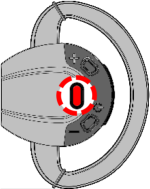
If the red LED lights up on the ME1 receiver during a tour, charge the device as soon as possible.
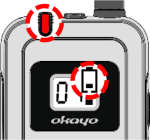
When the low battery indicator appears, charge the ME1T transmitter as soon as possible:
- Red LED,
- One battery bar.
6. Checking battery status when the receiver is off
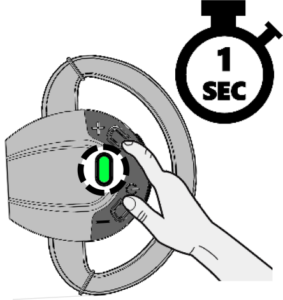
To quickly check the battery charge status of the ME1 receiver when it is OFF, press and hold the Volume Up + and Volume Down − buttons simultaneously.
| LED Status | Battery Status |
|---|---|
| Green LED is steadily lit |
75% ↑ |
| Green LED flashes |
50% – 75% |
| LED flashes alternately green and red |
25% – 50% |
| Red LED is steadily lit |
25% ↓ |
7. LED Indicator
ME1 Receiver
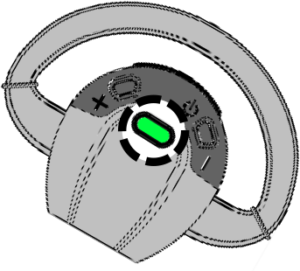
| LED Status | ME1 Receiver |
|---|---|
| Green |
Full power |
| Red |
Low power (5% ↓) |
| Steady |
In group (paired) |
| Flashes slowly |
Out of group |
| Flashes rapidly |
Searching for transmitter |
ME1T Transmitter
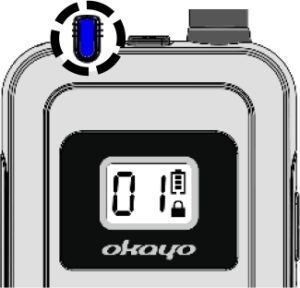
| LED Status | ME1T Transmitter |
|---|---|
| Blue |
Full power |
| Red |
Low power |
| Steady |
Device is on |
| Flashes slowly |
Muted |
| Flashes rapidly |
Pairing receivers in progress |
8. Increasing microphone sensitivity on the ME1T transmitter
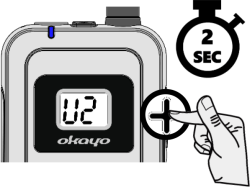
STEP 1. On the transmitter, press and hold the Up + button until the U2 symbol appears on the display.
STEP 2. Use the Up + or Down − buttons to select a symbol from U1 to U5 on the display (where U1 indicates the lowest sensitivity and U5 the highest).
STEP 3. After selecting the appropriate sensitivity level, the ME1T transmitter will automatically return to the main screen.
9. Connecting the transmitter to an external audio source
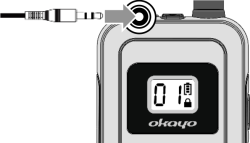
To play additional information to group members via an external audio player, follow the steps below to set the AUX level on the ME1T transmitter for the best listening experience.
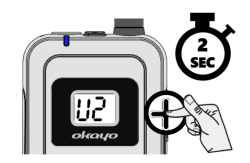
STEP 1. On the transmitter, press and hold the Up + button for 2 seconds until the U2 symbol appears on the display.
STEP 2. Use the Down − button to select the AU symbol.
STEP 3. After selecting the above settings, the ME1T transmitter will automatically return to the main screen.
10. Remote channel change for all receivers during a tour
⚠ Note
If interference occurs, it is recommended to change the channel. This function is unavailable when an external audio source is connected to the transmitter (AUX function enabled).
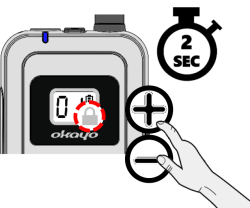
STEP 1. On the ME1T transmitter, press the Up + and Down − buttons simultaneously to unlock the channel. The padlock symbol 🔒 will disappear from the display.
STEP 2. Select a different channel using the Up + or Down − button. After selection, the new channel will be automatically locked.
STEP 3. All group members (all receivers) are remotely switched to the newly set channel.
STEP 4. When the LEDs on all receivers light up, it means the channel change has been successfully completed.
11. Remote tour termination
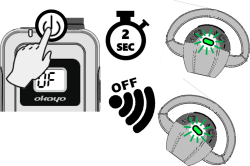
All group participants' receivers will be remotely turned off when the ME1T transmitter is turned off by pressing and holding the power button for 2 seconds. The LEDs on the ME1 receivers will flash twice and then turn off.
12. Troubleshooting
Q: Why can't I hear content transmitted from the ME1T transmitter on the ME1 receiver?
A: Check the following:
- Check if the ME1 receiver is turned on.
- Check if the LED on the ME1 receiver is continuously lit — this indicates that the receiver is synchronized and belongs to the group (correctly paired).
- Check if the volume on the ME1 receiver is set correctly.
- Check if the ME1T transmitter is not muted (if so, the LED on the transmitter flashes slowly).
Q: Why is the microphone volume of the ME1T transmitter so low?
A: Check the following:
- Check if the microphone sensitivity gain is set correctly.
- Check if the external microphone is not damaged.