
Receiver adjustment for a person with a hearing aid
The receivers have a built-in HAC (Hearing Aid Compatible) system
To enable people using hearing aids to comfortably use the tour guide receiver, you should:
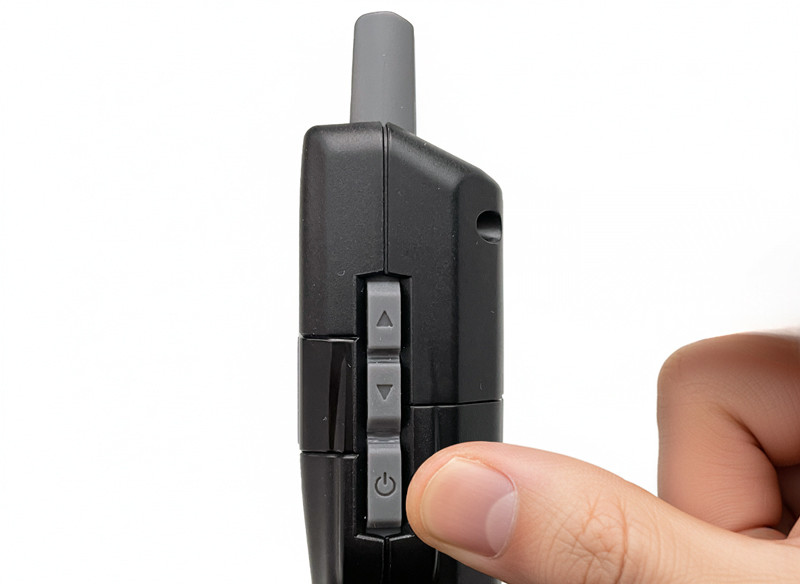
Turn off the receiver (if it is on) by pressing and holding the power button (⏻) on the side of the device.
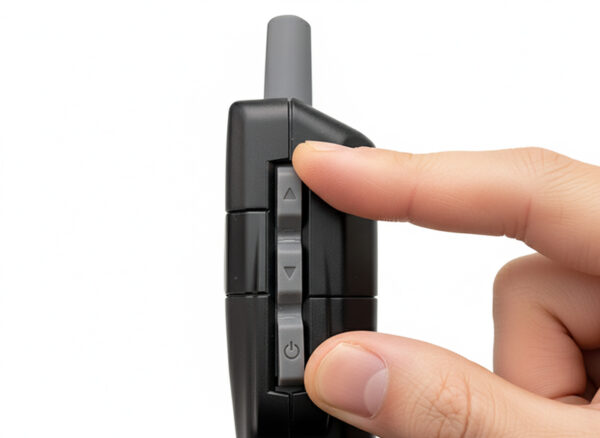
Restart the receiver in settings mode by simultaneously pressing and holding the power button (⏻) and the channel up button (▲).
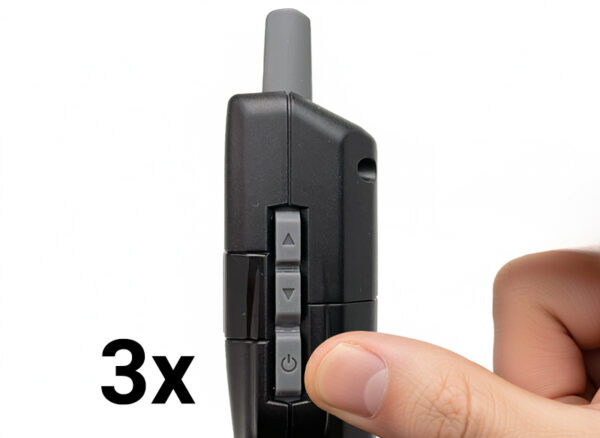
Navigate to the "EP" setting by pressing the power button three times (this will skip the 3 previous settings).
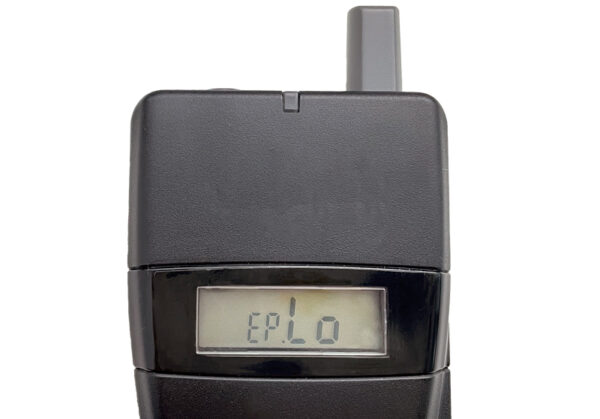
When the letters "EP" and the flashing letters "Lo" appear on the display, change the setting using the channel buttons (▲,▼ located on the side of the device) to the "Hi" setting and confirm with the power button (⏻).
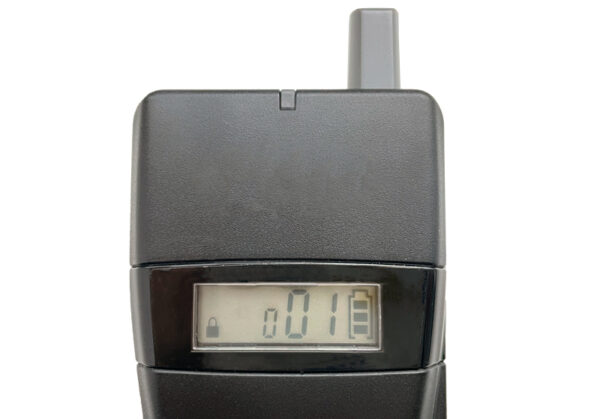
The receiver will enter operating mode and display the last used channel number.
Note! However, some older types of hearing aids will require the use of an induction loop.
[vc_row full_width=”stretch_row_content” css=”.vc_custom_1759142510220{border-bottom-width: 1px !important;background-color: #F9F9F9 !important;border-bottom-style: solid !important;border-color: #E6E6E6 !important;}”][vc_column width=”1/4″ offset=”vc_hidden-xs”][vc_single_image image=”66827″ img_size=”” onclick=”custom_link” css=”.vc_custom_1759143616121{padding-top: 5px !important;padding-left: 70px !important;}” link=”http://mexpo.eu/pmab”][/vc_column][vc_column width=”3/4″ offset=”vc_hidden-xs”][/vc_column][vc_column offset=”vc_hidden-lg vc_hidden-md vc_hidden-sm”][vc_single_image image=”66827″ img_size=”” alignment=”center” onclick=”custom_link” css=”” link=”http://mexpo.eu/pmab”][/vc_column][/vc_row][vc_section][vc_row full_width=”stretch_row” css=”.vc_custom_1759142644181{margin-bottom: 50px !important;background-color: #F9F9F9 !important;}”][vc_column css=”.vc_custom_1759142673899{padding-top: 50px !important;padding-bottom: 50px !important;}” offset=”vc_hidden-xs”][vc_custom_heading text=”Receiver adjustment for a person with a hearing aid” font_container=”tag:h2|font_size:50|text_align:center” google_fonts=”font_family:Noto%20Sans%3Aregular%2Citalic%2C700%2C700italic|font_style:700%20bold%20regular%3A700%3Anormal” css=””][/vc_column][vc_column offset=”vc_hidden-lg vc_hidden-md vc_hidden-sm”][vc_custom_heading text=”Receiver adjustment for a person with a hearing aid” font_container=”tag:h2|font_size:30|text_align:center” google_fonts=”font_family:Noto%20Sans%3Aregular%2Citalic%2C700%2C700italic|font_style:700%20bold%20regular%3A700%3Anormal” css=”.vc_custom_1759142760808{padding-bottom: 20px !important;}”][/vc_column][/vc_row][vc_row full_width=”stretch_row” content_placement=”middle”][vc_column][vc_custom_heading text=”The receivers have a built-in HAC (Hearing Aid Compatible) system” font_container=”tag:h2|font_size:25|text_align:left” google_fonts=”font_family:Noto%20Sans%3Aregular%2Citalic%2C700%2C700italic|font_style:700%20bold%20regular%3A700%3Anormal” css=”.vc_custom_1758634780911{border-bottom-width: 1px !important;border-bottom-style: solid !important;}”][vc_column_text css=””]To enable people using hearing aids to comfortably use the tour guide receiver, you should:[/vc_column_text][vc_row_inner content_placement=”middle”][vc_column_inner width=”1/4″][vc_single_image image=”67142″ img_size=”” alignment=”center” css=””][/vc_column_inner][vc_column_inner width=”3/4″][vc_column_text css=””]Turn off the receiver (if it is on) by pressing and holding the power button ( ) on the side of the device.[/vc_column_text][/vc_column_inner][/vc_row_inner][vc_row_inner content_placement=”middle”][vc_column_inner width=”1/4″][vc_single_image image=”67140″ img_size=”” alignment=”center” css=””][/vc_column_inner][vc_column_inner width=”3/4″][vc_column_text css=””]Restart the receiver in settings mode by simultaneously pressing and holding the power button () and the channel up button (▲).[/vc_column_text][/vc_column_inner][/vc_row_inner][vc_row_inner content_placement=”middle”][vc_column_inner width=”1/4″][vc_single_image image=”67149″ img_size=”” alignment=”center” css=””][/vc_column_inner][vc_column_inner width=”3/4″][vc_column_text css=””]Navigate to the “EP” setting by pressing the power button three times (this will skip the 3 previous settings).[/vc_column_text][/vc_column_inner][/vc_row_inner][vc_row_inner content_placement=”middle”][vc_column_inner width=”1/4″][vc_single_image image=”67137″ img_size=”medium” alignment=”center” css=””][/vc_column_inner][vc_column_inner width=”3/4″][vc_column_text css=””]When the letters “EP” and the flashing letters “Lo” appear on the display, change the setting using the channel buttons (▲,▼ located on the side of the device) to the “Hi” setting and confirm with the power button ().[/vc_column_text][/vc_column_inner][/vc_row_inner][vc_row_inner content_placement=”middle”][vc_column_inner width=”1/4″][vc_single_image image=”67138″ img_size=”medium” alignment=”center” css=””][/vc_column_inner][vc_column_inner width=”3/4″][vc_column_text css=””]The receiver will enter operating mode and display the last used channel number.
Note! However, some older types of hearing aids will require the use of an induction loop.[/vc_column_text][/vc_column_inner][/vc_row_inner][/vc_column][/vc_row][/vc_section]