
C50 Charger
Channel Synchronization
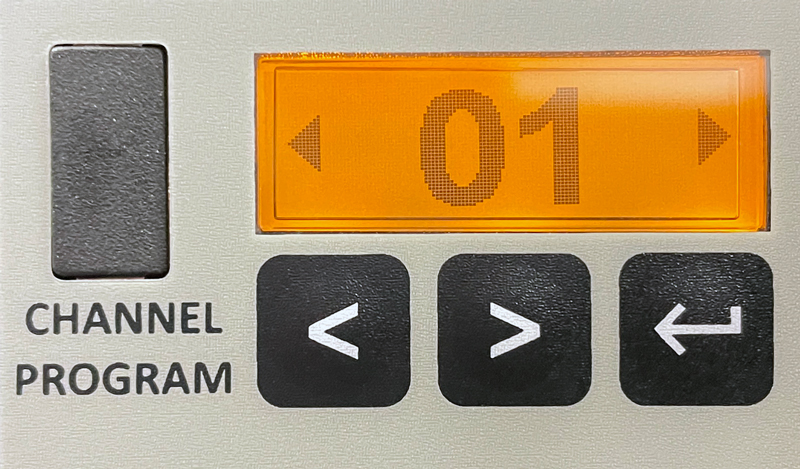
- Press the ▲ or ▼ button to select a predefined channel number and then press the OK button to confirm the newly selected channel and start channel synchronization.
- During channel synchronization, the screen will appear on the control panel, and the charging LEDs will automatically turn off.
- Check the LEDs on all devices to confirm the channel synchronization result.
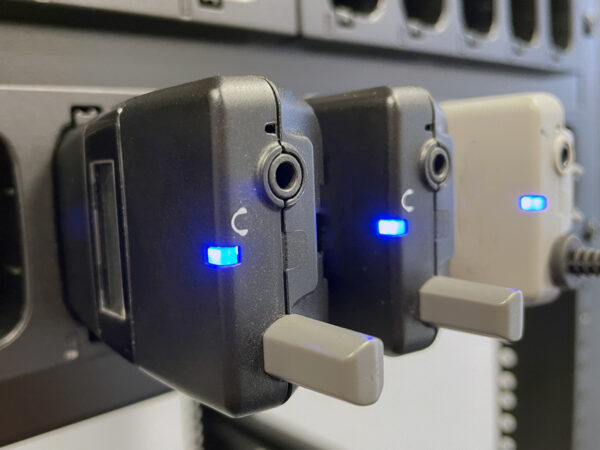
| Solid blue light for 10 seconds, then off | Channel synchronization completed successfully. |
| Continuous red flashing | Channel synchronization failed. |
| No light | The device is not properly inserted. Remove it and reinsert it into the charger. Or the charging contacts are potentially affected by corrosion. Clean them with a dry cloth, then reinsert the units into the charger. |
Interface
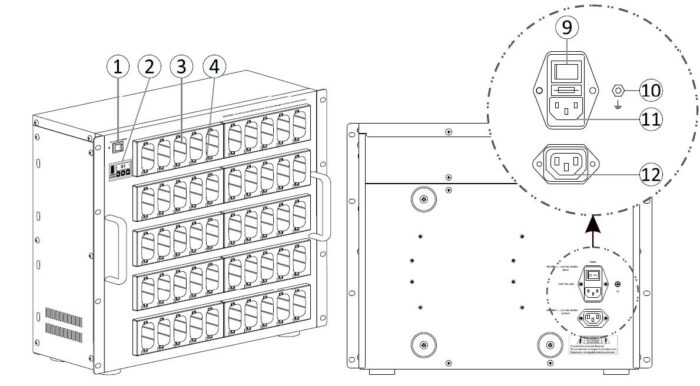
① LED Power Switch
② Control Panel
③ Charging Socket
④ Charging LED
● Red light: Charging
● Green light: Fully charged
● Red flashing: Charging error
◯ No LED: No units
⑨ Ground
⑩ AC Input
AC Output
⑪ Maximum 4 chargers allow series power connection
Power Saving Mode
- This mode will be activated when no devices are in the charger for 10 minutes.
- Control Panel: OFF
- LED Switch: LED flashes
- Press any button to exit this mode.
Troubleshooting
The red charging LED on the charger is flashing.
- Ensure that the correct batteries are installed in the devices.
- Ensure that the batteries are functioning correctly.
The charging LEDs on the charger are not lit.
- Ensure that the devices are correctly inserted into the charging slots.
- Ensure that the charging contacts on both the devices and the charger are clean and free of corrosion.
Channel unification failed (red LEDs on devices are flashing).
- Ensure that the devices and the charger have the same channel data.
- Keep the charger away from heat sources and ensure good ventilation.
- Regularly clean the charging contacts with a dry cloth to prevent charging problems.
- Disposable batteries must not be used.
- Only use the included power adapter for operation.
- Do not move or squeeze the charger improperly.
[vc_row full_width=”stretch_row_content” css=”.vc_custom_1759146786905{border-bottom-width: 1px !important;background-color: #F9F9F9 !important;border-bottom-style: solid !important;border-color: #E6E6E6 !important;}”][vc_column width=”1/4″ offset=”vc_hidden-xs”][vc_single_image image=”66827″ img_size=”full” onclick=”custom_link” css=”.vc_custom_1759149090773{padding-top: 5px !important;padding-left: 70px !important;}” link=”http://mexpo.eu/pmab”][/vc_column][vc_column width=”3/4″ offset=”vc_hidden-xs”][/vc_column][vc_column offset=”vc_hidden-lg vc_hidden-md vc_hidden-sm”][vc_single_image image=”66827″ img_size=”full” alignment=”center” onclick=”custom_link” css=”” link=”http://mexpo.eu/pmab”][/vc_column][/vc_row][vc_section][vc_row full_width=”stretch_row” css=”.vc_custom_1759146939535{background-color: #F9F9F9 !important;}”][vc_column offset=”vc_hidden-xs”][vc_custom_heading text=”C50 Charger” font_container=”tag:h2|font_size:50|text_align:center” google_fonts=”font_family:Noto%20Sans%3Aregular%2Citalic%2C700%2C700italic|font_style:700%20bold%20regular%3A700%3Anormal” css=”.vc_custom_1759146948455{padding-top: 50px !important;padding-bottom: 50px !important;}”][/vc_column][vc_column offset=”vc_hidden-lg vc_hidden-md vc_hidden-sm”][vc_custom_heading text=”C50 Charger” font_container=”tag:h2|font_size:30|text_align:center” google_fonts=”font_family:Noto%20Sans%3Aregular%2Citalic%2C700%2C700italic|font_style:700%20bold%20regular%3A700%3Anormal” css=”.vc_custom_1759146898859{padding-bottom: 20px !important;}”][/vc_column][/vc_row][vc_row full_width=”stretch_row” content_placement=”middle”][vc_column][vc_custom_heading text=”Channel Synchronization” font_container=”tag:h2|font_size:25|text_align:left” google_fonts=”font_family:Noto%20Sans%3Aregular%2Citalic%2C700%2C700italic|font_style:700%20bold%20regular%3A700%3Anormal” css=”.vc_custom_1758608555462{border-bottom-width: 1px !important;border-bottom-style: solid !important;}”][vc_row_inner content_placement=”middle”][vc_column_inner width=”1/4″][vc_single_image image=”67130″ img_size=”” alignment=”center” css=””][/vc_column_inner][vc_column_inner width=”3/4″][vc_column_text css=””]
- Press the
 or
or  button to select a predefined channel number
  and then press the
  button to confirm the newly selected channel and start channel synchronization.
 - During channel synchronization, the
 screen will appear on the control panel, and the charging LEDs will automatically turn off.
 - Check the LEDs on all devices to confirm the channel synchronization result.
[/vc_column_text][/vc_column_inner][/vc_row_inner][vc_row_inner content_placement=”middle”][vc_column_inner width=”1/4″][vc_single_image image=”67132″ img_size=”” alignment=”center” css=””][/vc_column_inner][vc_column_inner width=”3/4″][vc_raw_html css=””]JTNDc3R5bGUlM0UlMEQlMEElMjAlMjAuZ3JpZC10YWJsZSUyMHRkJTIwJTdCJTBEJTBBJTIwJTIwJTIwJTIwcGFkZGluZyUzQSUyMDEwcHglM0IlMEQlMEElMjAlMjAlMjAlMjB2ZXJ0aWNhbC1hbGlnbiUzQSUyMG1pZGRsZSUzQiUyMCUyRiUyQSUyMFRhJTIwbGluaWElMjB3eXIlQzMlQjN3bnVqZSUyMHRla3N0JTIwZG8lMjAlQzUlOUJyb2RrYSUyMCUyQSUyRiUwRCUwQSUyMCUyMCUyMCUyMGJvcmRlciUzQSUyMDFweCUyMHNvbGlkJTIwJTIzOTk5JTNCJTBEJTBBJTIwJTIwJTdEJTBEJTBBJTIwJTIwJTBEJTBBJTIwJTIwLmdyaWQtdGFibGUlMjB0ZCUzQWZpcnN0LWNoaWxkJTIwJTdCJTBEJTBBJTIwJTIwJTIwJTIwZm9udC13ZWlnaHQlM0ElMjBib2xkJTNCJTBEJTBBJTIwJTIwJTdEJTBEJTBBJTNDJTJGc3R5bGUlM0UlMEQlMEElMEQlMEElM0N0YWJsZSUyMGNsYXNzJTNEJTIyZ3JpZC10YWJsZSUyMiUzRSUwRCUwQSUyMCUyMCUzQ3Rib2R5JTNFJTBEJTBBJTIwJTIwJTIwJTIwJTNDdHIlM0UlMEQlMEElMjAlMjAlMjAlMjAlMjAlMjAlM0N0ZCUzRVN0YSVDNSU4MmUlMjBuaWViaWVza2llJTIwJUM1JTlCd2lhdCVDNSU4Mm8lMjBwcnpleiUyMDEwJTIwc2VrdW5kJTJDJTIwYSUyMG5hc3QlQzQlOTlwbmllJTIwd3klQzUlODIlQzQlODVjem9uZSUzQyUyRnRkJTNFJTBEJTBBJTIwJTIwJTIwJTIwJTIwJTIwJTNDdGQlM0VTeW5jaHJvbml6YWNqYSUyMGthbmElQzUlODIlQzMlQjN3JTIwem9zdGElQzUlODJhJTIwd3lrb25hbmElMjBwb215JUM1JTlCbG5pZS4lM0MlMkZ0ZCUzRSUwRCUwQSUyMCUyMCUyMCUyMCUzQyUyRnRyJTNFJTBEJTBBJTIwJTIwJTIwJTIwJTNDdHIlM0UlMEQlMEElMjAlMjAlMjAlMjAlMjAlMjAlM0N0ZCUzRUNpJUM0JTg1ZyVDNSU4MmUlMjBtaWdhbmllJTIwbmElMjBjemVyd29ubyUzQyUyRnRkJTNFJTBEJTBBJTIwJTIwJTIwJTIwJTIwJTIwJTNDdGQlM0VOaWV1ZGFuYSUyMHN5bmNocm9uaXphY2phJTIwa2FuYSVDNSU4MiVDMyVCM3cuJTNDJTJGdGQlM0UlMEQlMEElMjAlMjAlMjAlMjAlM0MlMkZ0ciUzRSUwRCUwQSUyMCUyMCUyMCUyMCUzQ3RyJTNFJTBEJTBBJTIwJTIwJTIwJTIwJTIwJTIwJTNDdGQlM0VCcmFrJTIwJUM1JTlCd2lhdCVDNSU4MmElM0MlMkZ0ZCUzRSUwRCUwQSUyMCUyMCUyMCUyMCUyMCUyMCUzQ3RkJTNFVXJ6JUM0JTg1ZHplbmllJTIwbmllJTIwamVzdCUyMGRvYnJ6ZSUyMHclQzUlODJvJUM1JUJDb25lLiUyMFd5am1paiUyMGdvJTIwaSUyMHclQzUlODIlQzMlQjMlQzUlQkMlMjBwb25vd25pZSUyMGRvJTIwJUM1JTgyYWRvd2Fya2kuJTIwTHViJTIwc3R5a2klMjAlQzUlODJhZG93YW5pYSUyMHBvdGVuY2phbG5pZSUyMGRvdGtuaSVDNCU5OXRhJTIwa29yb3pqYS4lMjBXeWN6eSVDNSU5QiVDNCU4NyUyMGplJTIwc3VjaCVDNCU4NSUyMHN6bWF0ayVDNCU4NSUyQyUyMGElMjBuYXN0JUM0JTk5cG5pZSUyMHBvbm93bmllJTIwdyVDNSU4MiVDMyVCMyVDNSVCQyUyMGplZG5vc3RraSUyMGRvJTIwJUM1JTgyYWRvd2Fya2kuJTNDJTJGdGQlM0UlMEQlMEElMjAlMjAlMjAlMjAlM0MlMkZ0ciUzRSUwRCUwQSUyMCUyMCUzQyUyRnRib2R5JTNFJTBEJTBBJTNDJTJGdGFibGUlM0U=[/vc_raw_html][/vc_column_inner][/vc_row_inner][/vc_column][/vc_row][vc_row full_width=”stretch_row” content_placement=”middle”][vc_column][vc_custom_heading text=”Interface” font_container=”tag:h2|font_size:25|text_align:left” google_fonts=”font_family:Noto%20Sans%3Aregular%2Citalic%2C700%2C700italic|font_style:700%20bold%20regular%3A700%3Anormal” css=”.vc_custom_1758608929725{border-bottom-width: 1px !important;border-bottom-style: solid !important;}”][/vc_column][vc_column width=”5/12″][vc_single_image image=”66730″ img_size=”700×386″ alignment=”center” css=””][/vc_column][vc_column width=”1/4″][vc_column_text css=””]① LED Power Switch
② Control Panel
③ Charging Slot
④ Charging LED
Red light: Charging
Green light: Fully charged
Red light flashes: Charging error
No light: No units[/vc_column_text][/vc_column][vc_column width=”1/4″][vc_column_text css=””]⑨ Grounding
⑩ AC Input
AC Output
⑪ A maximum of 4 chargers can be daisy-chained for power[/vc_column_text][/vc_column][/vc_row][vc_row full_width=”stretch_row”][vc_column][vc_message message_box_color=”danger” css=””]Ensure that Ni-MH AA batteries are inserted into all units during programming.[/vc_message][/vc_column][/vc_row][vc_row full_width=”stretch_row” content_placement=”top”][vc_column][vc_custom_heading text=”Power Saving Mode” font_container=”tag:h2|font_size:25|text_align:left” google_fonts=”font_family:Noto%20Sans%3Aregular%2Citalic%2C700%2C700italic|font_style:700%20bold%20regular%3A700%3Anormal” css=”.vc_custom_1758608572366{border-bottom-width: 1px !important;border-bottom-style: solid !important;}”][vc_column_text css=””]
- This mode will be activated when no devices are in the charger for 10 minutes.
– Control Panel: OFF
– LED Switch: LED flashes - Press any button to exit this mode.
[/vc_column_text][/vc_column][/vc_row][vc_row full_width=”stretch_row” content_placement=”top”][vc_column][vc_custom_heading text=”Troubleshooting” font_container=”tag:h2|font_size:25|text_align:left” google_fonts=”font_family:Noto%20Sans%3Aregular%2Citalic%2C700%2C700italic|font_style:700%20bold%20regular%3A700%3Anormal” css=”.vc_custom_1758608578631{border-bottom-width: 1px !important;border-bottom-style: solid !important;}”][vc_column_text css=””]The red charging LED on the charger is flashing.
- Ensure that the correct batteries are installed in the devices.
- Ensure that the batteries are functioning correctly.
The charging LEDs on the charger are not lit.
- Ensure that the devices are correctly inserted into the charging slots.
- Ensure that the charging contacts on both the devices and the charger are clean and free of corrosion.
Channel unification failed (red LEDs on devices are flashing).
- Ensure that the devices and the charger have the same channel data.
[/vc_column_text][/vc_column][/vc_row][vc_row full_width=”stretch_row” content_placement=”middle”][vc_column][vc_message message_box_color=”alert-warning” icon_fontawesome=”fa fa-solid fa-triangle-exclamation” css=””]
- Keep the charger away from heat sources and ensure good ventilation.
- Regularly clean the charging contacts with a dry cloth to prevent charging problems.
- Disposable batteries must not be used.
- Only use the included power adapter for operation.
- Do not move or squeeze the charger improperly.
[/vc_message][/vc_column][/vc_row][/vc_section]